
Seal APK
Do you want to download videos from YouTube or other platforms completely free, without ads, using an open-source app? Today, I will tell you about the Seal app. Seal is a simple and open-source Android application that lets you download videos and audio without ads. You can also download subtitles with it.

It works as a graphical interface for yt-dlp and supports content from Multiple websites and social media platforms, including YouTube, Facebook, Instagram, X, TikTok, and Reddit.
Where to Download Seal Apk?
Seal is not available on the Play Store, so you can get it from alternative sources. You can Download the Seal apk by clicking the download buttons on this website;(https://sealapp.org/) As you can see in the screenshot
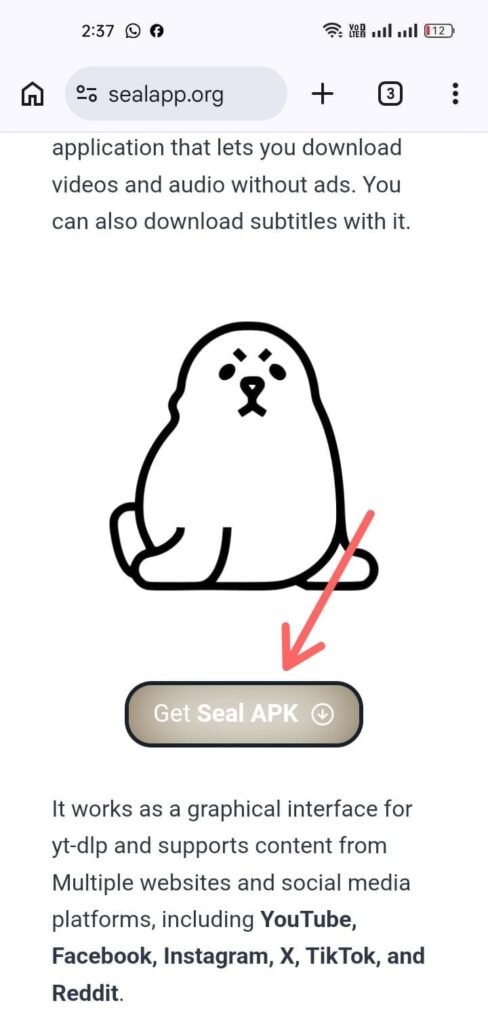
You can also download the app from its official GitHub page or install it through F-Droid. The app size is around 41 MB, it is not a large application.
Installing Seal App
Installing Seal APK on Android is straightforward. Follow the steps below.

After the download
Once the download is complete, open the Downloads folder on your phone. as shown in the screenshot..
Next Step: Installation
After the download is complete, click “Install” to start the installation, as shown in the screenshot.
Update Seal ApK
If a new update for the Seal App becomes available, update it immediately.
How to Use Seal APK?
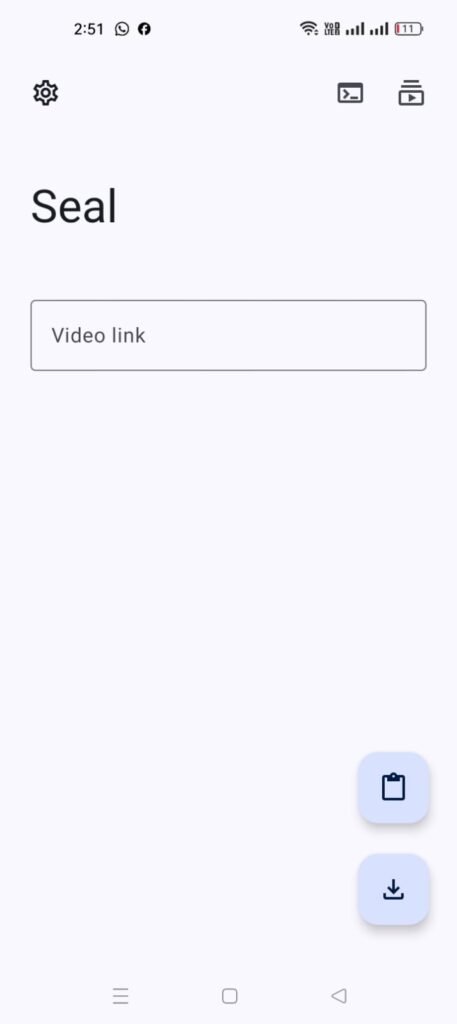
Seal APK Features
Its main features include:
- Video downloads from websites supported by yt-dlp
- Audio extraction from videos
- Multiple video quality options
- Playlist downloading
- Subtitle downloading and embedding
- Metadata, thumbnail, and artwork support
- Built-in aria2c downloader
- Custom yt-dlp commands and templates
- Download management
- Material Design 3 interface
- Free, open-source, and ad-free experience
Video Quality Selection
Seal offer you select the available video quality before downloading. Depending on the source, you may find options from 144p to 4K (2160p), including 720p HD and 1080p Full HD.
The available quality depends on the original video. Seal cannot provide a higher resolution than the source offers. Choosing a lower quality can also help reduce file size and save storage space.
Audio Download and Extraction
Seal can extract audio from supported videos, so you can download the audio without keeping the full video file.
Depending on the source and selected settings, available formats may include MP3, M4A, Opus, WAV, and FLAC. The supported format and final quality depend on the original media and download options.
Playlist Downloading
Seal supports playlist downloads through yt-dlp, allowing you to download multiple videos without processing each one separately.
Enter a supported playlist URL, select your preferred options, and start the download. This can be useful for courses, tutorials, lectures, and other video collections.
Subtitles for Downloaded Videos
Seal can download available subtitles and embed them into videos when supported by the source and download settings.
Metadata and Thumbnails
Seal can preserve available metadata and thumbnails when extracting supported audio. It uses Mutagen for metadata handling, allowing downloaded audio files to include information such as title, artist, album, and artwork.
This helps keep downloaded music and other audio files organized in compatible media players.
Built-In aria2c Support
Seal App supports aria2c as an external downloader, giving advanced users another option for handling downloads.
Regular users can continue with Seal’s default download method, while experienced users can enable aria2c when they need additional download control.
Custom yt-dlp Commands
Seal App also supports custom yt-dlp commands and templates for users who want more control over their downloads.
Basic downloads only require a supported URL, while advanced users can customize yt-dlp settings according to their needs.
Simple Android Interface
Seal App uses a Material Design 3 interface with dynamic color support, keeping the app familiar and easy to navigate on Android.
The basic download process is simple: share or paste a supported URL, select the desired video or audio option, choose the available quality or format, and start the download.
Free and Open Source
Seal apk is free and open-source software with no paid subscription for its core downloading features. Its source code is publicly available, allowing users and developers to review the project and contribute to its development.
Ad-Free Experience
Seal apk provides an ad-free downloading experience, so users can focus on selecting their download options without promotional content inside the app.
How Many Websites Does Seal Support?
Seal uses yt-dlp to support a wide range of websites instead of maintaining its own fixed list. Support can change when yt-dlp updates its extractors or when websites change their systems.
Download success also depends on the URL, privacy settings, login requirements, and current extractor support.
Can Seal Download YouTube Videos?
Yes. Seal app can download YouTube videos, audio, and playlists through yt-dlp. The available quality and formats depend on the original YouTube source.
Can Seal Download Social Media Videos?
Seal can process supported URLs from social media platforms covered by yt-dlp, including Facebook and Instagram.
Seal APK for Android Devices
Seal supports multiple Android architectures. For most modern phones, the arm64-v8a APK is the recommended choice.
Seal APK Download 2026
When downloading Seal APK in 2026, check the version number, release date, and Android architecture before installing.
Seal APK Old Version
Older Seal versions can be useful for devices that have compatibility issues with newer releases.
Before installing an old version, check that it supports your Android version and device architecture.
Seal APK MOD Download
You do not need a MOD version to access Seal’s main features. The original app is already free and ad-free.
For a safer and more reliable experience, use the original version instead of modified APKs.
Seal APK for PC
Seal is made for Android devices and does not have a native Windows or macOS version.
You can still run the Android app on a PC through a compatible Android emulator, although the experience may differ from using Seal directly on a phone.
Seal vs Basic Video Downloader
Seal offers more control than a basic video downloader. It supports video and audio downloads, playlists, subtitles, multiple formats, and quality options through yt-dlp.
This makes it suitable for users who want more downloading options while keeping the Android interface simple. You can:
- Download a single video
- Extract audio
- Choose available quality
- Process playlists
- Save subtitles
- Keep metadata
- Add thumbnails
- Use aria2c
- Create custom yt-dlp templates
- Manage downloads inside the application
That combination makes it useful for both casual downloads and more advanced workflows.
What’s Changed in v1.12.1?
Added
- Added an automatic update interval option for yt-dlp.
- The Cookies page now displays the current number of cookies stored in the database.
Fixed
- Fixed the handling of non-HTTP(s) URLs opened through the WebView.
- Fixed an issue where videos could be remuxed to MKV even when subtitle downloading was disabled.
- Added MD2
ModalBottomSheetLayoutsupport for devices running Android API versions below 30. - Downloads are now blocked while yt-dlp is being updated to prevent download-related problems.
Known Issues
- TextFields (IME) may fall back to plain character input when a ModalBottomSheet is displayed.
- yt-dlp may stop working if you start a download while yt-dlp is being updated. This can result in a “bad local file header” error. If this happens, simply update yt-dlp again to fix the problem.
Except for the source code licensed under the GPLv3 license, other parties are not permitted to use the Seal name for a downloader application. The same restriction applies to Seal derivatives, including forks and unofficial builds.
Common Questions About Seal APK
Why is Seal not downloading a video that worked before?
A website may have changed its system or yt-dlp may need an update. Check for the latest Seal version and try the download again.
Why does Seal ask for cookies on some YouTube videos?
Some videos require age verification or account authentication. Such content may need valid browser cookies to access.
Why does Instagram downloading sometimes fail in Seal?
Instagram changes its systems regularly, and some content may have access restrictions. Public content is more likely to work than restricted or login-dependent content.
Can Seal download Instagram Stories?
It can download supported Stories, but availability depends on the content and current extractor support. Some Stories may require authentication or may not be accessible.
Why does Seal download only one item from my playlist?
Check the playlist URL and make sure playlist downloading is enabled in the download options. Also confirm that the required items are selected.
Can Seal keep YouTube playlist order?
Seal can process playlists in their available order. However, your music player may sort the downloaded files differently based on filenames or metadata.
Where does Seal save downloaded files?
Seal saves files to the download folder selected in its settings. You can check the configured location through the app or your Android file manager.
Why do downloaded files appear in my phone’s gallery or other apps?
Android can automatically index media files stored in accessible folders. Moving the files to a different folder can prevent them from appearing in some media apps.
Why can an audio download temporarily use much more storage?
Audio extraction may require temporary files during processing. Large or high-resolution sources can therefore use more storage than the final audio file.
Does Seal always download only the audio when I select audio?
The final result is an audio file, but temporary video data may be used during extraction. Keep enough free storage when processing large sources.
Is Seal still considered a good Android downloader?
Seal is a useful option for Android users who want video, audio, playlist, subtitle, and format options in one app. Download results can still vary between websites.
Why does one website work while another does not?
Different websites use different systems, and their extractor support can vary. A website update can also affect downloads without affecting other services.
Does Seal need a separate account?
Seal does not require a paid account for normal use. Some websites may still require authentication for restricted content.
Is Seal APK safe to install?
Use the original Seal release from a trusted source and avoid modified or repacked APKs. This reduces the risk of installing an altered or unsafe version.
Is Seal available on Google Play Store?
Seal is mainly distributed through other trusted channels rather than Google Play. Always check the publisher before installing an APK.
What APK architecture should I download?
For most modern Android phones, arm64-v8a is the recommended build. Older or different devices may require another architecture.
Can Seal download copyrighted videos?
Seal’s download capability does not give permission to copy copyrighted content. Download only media that you own or have permission to save.
Final Thoughts
Seal APK is a free, open-source, and ad-free downloader for Android. It supports video and audio downloads, playlists, subtitles, multiple formats, and quality options through a simple interface.
For the best experience, use a trusted APK source, choose the correct device architecture, and select the quality that suits your storage and playback needs.